


A gaming PC can lose work in seconds when an outage interrupts a match, stream, or long editing session. Battery backups add a short runway for controlled shutdowns and protect sensitive electronics from voltage changes, while the right capacity depends on your PC, monitor, network gear, and peripherals. You’ll find sensible options here for compact desks, performance setups, rack-mounted systems, and users who value straightforward protection.
The Essentials At A Glance

CyberPower CP1500PFCLCD PFC Sinewave UPS
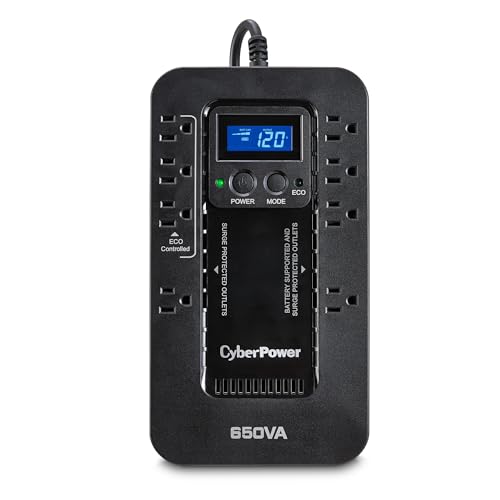
CyberPower EC650LCD Ecologic UPS

CyberPower GX150C2-E Gaming UPS

APC BR1500MS2 Pure Sine Wave UPS

CyberPower CP2000PFCRM2U PFC Sinewave UPS

CyberPower OR500LCDRM1U Smart App LCD UPS

CyberPower CP1500PFCRM2U PFC Sinewave UPS
More On The Choices That Made The List
The CP1500PFCLCD gives a desktop gaming setup a more considered power foundation than a basic surge strip. Its PFC sine wave output suits modern active power factor correction supplies, a detail that matters for current PC builds. The color LCD also turns battery status and operating conditions into information you can check without guessing.
For daily gaming, streaming, and work at the same desk, this model makes sense as a central protector for the PC, monitor, and connected equipment. Compared with the EC650LCD later in the list, it offers the higher-capacity format and cleaner output that many active-PFC systems prefer. In your view, it suits users who want useful controls without moving into a rack enclosure.
What Earns Its Place
- PFC sine wave output supports compatible active-PFC gaming PCs.
- The color LCD provides visible battery and power-status information.
- Surge protection covers essential desktop equipment.
- Its desktop format fits neatly beside a tower or monitor.
Points To Note
- Runtime depends on the combined draw of your PC and peripherals.
- The larger unit takes more room than the EC650LCD, and battery maintenance deserves attention over time.
Key Specs
Right Fit For
You benefit most from this model with a modern gaming desktop using active-PFC power supplies and several connected peripherals.
A Better Fit Elsewhere
The CyberPower EC650LCD is a stronger fit for compact desks where lower capacity and a smaller footprint matter more than pure sine wave output.
The EC650LCD is built for a smaller power footprint, which makes it useful beside a modest gaming desk or home-office setup. It uses standby operation with simulated sine wave output, so it works best with equipment that does not demand pure sine wave support. The LCD adds a clear view of status information where a basic model would leave you relying on LEDs.
Its practical appeal comes from covering a gaming PC, router, monitor, and smaller electronics without occupying a rack shelf. Compared with the CP1500PFCLCD, the tradeoff is capacity and output type rather than placement. Depending on your desk, the compact housing may matter more than longer runtime, especially when your system already uses an efficient power supply.
Strengths Worth Knowing
- Compact housing works well in space-conscious setups.
- LCD status feedback simplifies routine monitoring.
- Battery backup supports controlled shutdowns during outages.
- Surge protection is useful for everyday desktop equipment.
Smaller Details
- Simulated sine wave output is less appropriate for sensitive equipment requiring pure sine wave power.
- Runtime will be modest with a power-hungry gaming system, so keep expectations realistic.
Made For
This model suits a compact gaming PC, network equipment, and users who want a neat desktop unit rather than a rack-mounted system.
Another Choice May Suit
The APC BR1500MS2 is the better match for a workstation that benefits from pure sine wave output and a higher listed wattage.
The GX150C2-E is explicitly aimed at gaming and performance setups, so its 1500VA/1000W capacity deserves close attention in your setup planning. That level of headroom can cover a gaming PC with selected peripherals, although runtime still depends on actual load. The design gives your system time to shut down cleanly after a sudden outage.
It stands apart from the more general-purpose EC650LCD by targeting gaming PCs, consoles, and streaming equipment. You’ll want to add the UPS load carefully rather than connect every device indiscriminately, especially during long sessions. The gaming focus is compelling for enthusiasts, but a modest PC may not need the full capacity.
Features That Help
- 1500VA/1000W capacity suits many gaming-PC loads.
- Battery backup helps protect an active match from abrupt shutdown.
- Surge protection adds a second layer for connected equipment.
- Streaming and console support broadens the gaming-desk use case.
- Controlled shutdown time can reduce data-loss risk.
Trade-Offs
- Runtime can shrink quickly with a high-power GPU system.
- Capacity planning matters, and battery upkeep remains part of ownership.
Feature Snapshot
Built With In Mind
You’ll appreciate this model most when a gaming PC, console, and streaming equipment share one protected power plan.
Consider Something Else
The CyberPower CP2000PFCRM2U offers a higher-capacity rack-oriented alternative for larger performance systems.
The BR1500MS2 focuses on clean power for computers, routers, workstations, and home electronics. Pure sine wave output is the key technical feature, meaning the UPS supplies a waveform designed to resemble utility power more closely than a simulated alternative. That makes it a thoughtful match for sensitive systems and power supplies.
Compared with the CP1500PFCLCD, this APC model offers a different brand and a pure sine wave approach, while both target desktop protection. You’ll want to compare measured load against the 1500VA/900W rating, especially with a power-hungry graphics card. For a shared gaming and work station, its broad electronics support is a practical strength.
The Value In It
- Pure sine wave output suits sensitive electronics.
- 1500VA/900W capacity supports many desktop configurations.
- Battery backup creates time for an orderly shutdown.
- Surge protection covers connected home-office equipment.
Honest Caveats
- Runtime depends heavily on your GPU, monitor, and other connected devices.
- It may be more capacity than a compact entry-level setup needs.
Technical Sheet
Who Should Grab It
This model fits you best when a workstation or gaming PC needs pure sine wave output alongside desktop backup protection.
Where Another Pick Shines
The CyberPower EC650LCD is more practical for a small desk where compact size matters more than pure sine wave power.
The CP2000PFCRM2U is aimed at installations where a desk-sized UPS may feel undersized, particularly with active-PFC equipment. Its PFC sine wave output, rackmount design, and noise filtering target systems that need more deliberate power conditioning. Automatic Voltage Regulation helps correct minor fluctuations without immediately switching to battery power.
Compared with the GX150C2-E, this model shifts from gaming-desk convenience toward rack-mounted flexibility and broader equipment support. You’ll need to account for rack clearance, ventilation, and cable management during installation. In your view, it is a better fit for a dedicated equipment area than a minimalist bedroom desk.
What Stands Out
- High-capacity format supports more demanding protected equipment.
- PFC sine wave output aligns with modern active-PFC supplies.
- EMI/RFI filtration helps reduce electrical noise around sensitive systems.
- AVR handles minor voltage variations more smoothly.
Possible Compromises
- Rackmount installation requires suitable space and mounting hardware.
- The larger system is unnecessary for a small PC-only desk.
- Battery replacement and ventilation deserve attention in a rack.
Feature Facts
Whose Shelf It Belongs On
This UPS fits you best with a rack-mounted PC, network equipment, security system, or active-PFC performance setup.
Reach For A Different Pick When
The GX150C2-E is the more natural alternative for a gaming PC kept at a desk without rack hardware.
The OR500LCDRM1U is a one-rack-unit UPS with a 500VA/300W rating, which makes it more relevant to network gear, small servers, and telecom equipment than a power-hungry gaming tower. Automatic Voltage Regulation helps smooth minor voltage changes, while the LCD gives you a local status view. The simulated sine wave output suits systems without active-PFC requirements.
That distinction matters for practical ownership. Compared with the CP2000PFCRM2U, this model saves vertical rack space but offers much less capacity. You may find it especially useful beside a rack-mounted network installation, provided your connected equipment stays within its rated load. The compact rack format also simplifies cable routing, while maintenance still requires occasional battery attention.
What It Does Well
- One-rack-unit construction preserves vertical space.
- 500VA/300W capacity fits smaller network and telecom loads.
- AVR helps correct minor voltage fluctuations.
- LCD status display simplifies local monitoring.
Less-Strong Areas
- 300W capacity is too limited for many gaming desktops with high-end graphics cards.
- Simulated sine wave output is not the right match for every active-PFC system.
The Right Fit
You’ll find this model most useful in a rack with routers, switches, telecom equipment, or a small server.
Not Your Match When
The CyberPower GX150C2-E is the better choice for a gaming PC, console, and streaming equipment at a desk.
The CP1500PFCRM2U combines PFC sine wave output with a rackmount format, making it a solid middle ground between a desktop UPS and a larger installed system. It is aimed at security systems, audio-visual equipment, and networking devices that use active-PFC supplies. Automatic Voltage Regulation helps manage small voltage swings without immediately drawing on the battery.
Compared with the CP2000PFCRM2U, the 1500-class model may be a more manageable starting point for a single rack or dedicated equipment shelf. Compared with the CP1500PFCLCD, it trades the desktop LCD-oriented presentation for rack installation and broader system targeting. You’ll want to verify your actual load, outlet layout, and rack clearance before committing.
What Works In Its Favor
- PFC sine wave output supports compatible modern systems.
- Rackmount form factor suits organized installations.
- AVR addresses minor voltage changes.
- EMI/RFI filtration helps protect sensitive connected equipment.
- It covers security, AV, and networking applications.
Details To Watch
- A desktop-only setup may not benefit from the rackmount format.
- Heavy systems still require careful load budgeting.
- Ventilation and battery upkeep matter in enclosed racks.
Quick Facts
Best Suited To
You’ll appreciate this model with a rack-mounted security, AV, or network system using active-PFC equipment.
A Better Fit Elsewhere
The CyberPower GX150C2-E is a more natural choice for a gaming setup that stays on a desk and prioritizes gaming-focused capacity.
What Matters Most For Gaming PC Protection
Match The UPS To Your Load
Start with the wattage draw of your PC, monitor, router, and peripherals rather than the label alone. A higher-end graphics card can consume enough power to make a smaller UPS inadequate, while a modest office PC may need less than a gaming system. Leave sensible headroom instead of running close to the limit.
Pure Sine Wave Or PFC Support?
Pure sine wave output offers a cleaner transition for sensitive electronics, while PFC-oriented models target modern active power factor correction supplies. Your PC power supply documentation and the UPS specification should be checked together. This detail prevents you from paying for protection that does not match your hardware.
Think Beyond Runtime
Runtime matters, but so do outlet count, LCD visibility, rack dimensions, noise filtering, and installation style. A compact desktop model suits a bedroom gaming desk, while a rackmount unit belongs near organized network or AV equipment. Battery age and ventilation also affect long-term ownership.
Build A Shutdown Plan
Configure your PC and applications to save work promptly after an outage notification. A UPS can provide a bridge, but it is not designed to power a full gaming rig indefinitely. Treating it as a short-term shutdown and protection tool gives you a more realistic plan for daily use.
Key Details Before You Settle
Common Shopping Slip Ups
Many shoppers focus on VA or wattage while overlooking the power supply’s output requirements. A surge protector alone does not provide the same battery bridge as a UPS. Check the UPS waveform, connections, and physical placement before purchase.
What The Higher Tier Buys
Higher-capacity models provide more room for power-hungry PCs and peripherals, while pure sine wave or advanced PFC support can improve compatibility with demanding hardware. The extra capacity is worthwhile for long sessions or multiple devices, not necessarily for a small system that only needs controlled shutdown time.
Frequently Asked Questions
Can A UPS Power A Gaming PC During A Long Outage?
A UPS can power a gaming PC for a limited period, depending on capacity and power draw. Its main advantage is giving your system time to save work and shut down safely rather than replacing a full generator.
Is Pure Sine Wave Better For A Gaming PC?
Pure sine wave output can be a better match for sensitive electronics and compatible modern power supplies. It costs more than simulated output in some cases, so check your PC power supply requirements before deciding.
How Large Should My Gaming PC UPS Be?
Choose a model with enough wattage for the PC, monitor, network equipment, and other connected devices, plus some headroom. A high-end gaming PC generally needs more capacity than a compact desktop.
Do I Need A UPS With Surge Protection?
Surge protection handles voltage spikes, while battery backup handles outages and some voltage fluctuations. Having both gives your equipment broader protection, although neither feature replaces careful installation and maintenance.
Can I Use A Rackmount UPS Beside A Desktop PC?
You can, provided the rackmount UPS has enough capacity and the physical installation is safe and ventilated. A desktop model is usually simpler when the system lives on a desk rather than in an equipment rack.
Final Take
Choose the CyberPower CP1500PFCLCD or APC BR1500MS2 for a straightforward desktop setup with clean power priorities, the GX150C2-E for gaming-focused capacity, or a rackmount model for network and AV equipment. Match the waveform, wattage, and physical format to your actual hardware, then plan for a controlled shutdown after an outage.
