


Finding Power That Matches Your Mouse
A wireless mouse can stop responding for many reasons, but battery age and power delivery are common culprits in daily work, study, and gaming. The right cells help your mouse maintain a steady connection without frequent shutdowns, while rechargeable options can simplify long-term ownership.
The practical difference comes down to chemistry, voltage, capacity, and charging convenience. Alkaline cells suit occasional replacement, NiMH cells work well with compatible charging systems, and 1.5-volt lithium options target devices designed to accept them. You’ll also find that AA and AAA aren’t interchangeable, so checking your mouse’s battery compartment prevents an avoidable mistake.
A Quick View Of The Lineup

Panasonic eneloop Quick Charger with 4 AAA Batteries

ACDelco 120-Count AAA and AA Super Alkaline Batteries

Kratax 3700mWh AA Lithium Batteries with Charger, 8 Pack
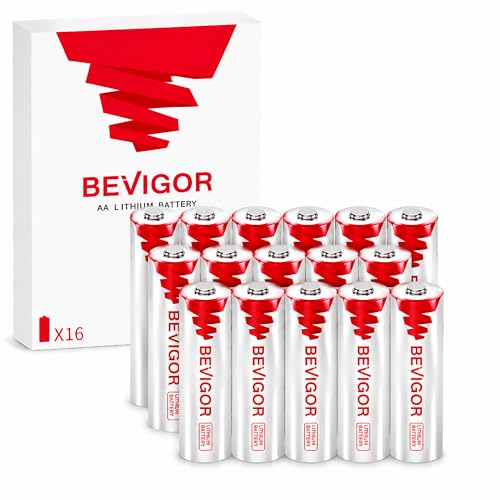
BEVIGOR 1.5V Lithium AA Batteries 16 Pack

BEVIGOR Upgraded 1.5V Lithium AA Batteries 24 Pack

BEVIGOR 1.5V Lithium AA Batteries 8 Pack

Panasonic eneloop NiMH AA 8-Pack and AAA 4-Pack
The Strengths Of Each Pick
This bundle centers on reusable AAA cells and a charger that handles one to four cells separately. Individual charging means each position receives its own managed charge, which suits desks where a mouse, keyboard, or presentation remote uses matching cells.
The main catch is the bundle size: it includes AAA rather than AA cells, so it doesn’t directly solve a typical AA-powered wireless mouse. You’ll find it more useful for AAA peripherals or as a compact charging station around a shared office.
Useful Touches
- Charges one to four AA or AAA cells individually
- Four AAA batteries are ready for use after charging
- Supports four-cell charging in up to three hours
- Recharge cycles reduce repeated disposable-battery purchases
Practical Considerations
- AAA cells won’t fit an AA battery compartment
- A compatible charger is required for routine NiMH charging
- Eneloop Pro cells need more time than standard eneloop cells
Key Attributes
Right Fit For
You’ll benefit most from a mixed desk full of AAA-powered peripherals and a preference for reusable cells.
Where A Sibling Pick Shines
Panasonic eneloop NiMH AA 8-Pack and AAA 4-Pack is the better fit when your wireless mouse specifically requires AA cells.
A large mixed-size supply makes this a practical choice for homes where batteries disappear into mice, clocks, remotes, toys, controllers, and cameras. You receive 60 AAA and 60 AA cells, so you can cover several devices without sorting everything into separate packs.
Alkaline chemistry remains the straightforward option for intermittent use. During a long work session, your mouse receives fresh 1.5-volt cells without a charger, though the single-use format creates more waste than the rechargeable choices later in this roundup.
Why It Works Well
- Equal quantities of AA and AAA cells reduce household guesswork
- Fresh alkaline cells suit mice, remotes, and everyday electronics
- A large count suits offices, classrooms, and busy households
- Stainless-steel coating is designed to limit leakage
Small Caveats
- Used cells require sorting and regular disposal
- Storage becomes less efficient after several cells are removed
- A rechargeable charger is not included
Feature Snapshot
Made For
Large households and offices get the most benefit from stocking AA and AAA cells together.
A Better Fit Elsewhere
BEVIGOR 1.5V Lithium AA Batteries 8 Pack suits you better when compact 1.5-volt storage matters more than having both cell sizes.
The Kratax set takes a different route from ordinary AA cells by combining 1.5-volt lithium-ion batteries, a charger, and a storage case. Each cell is rated at 3700mWh, while the set is designed to support output up to 3 amps for compatible high-current devices.
That capacity may appeal to you during long workdays or intensive device use, though your mouse must accept 1.5-volt lithium-ion cells. The integrated case keeps charging and storage together, which is more convenient than loose cells scattered near a monitor.
Advantages To Know
- Eight cells cover several compatible AA-powered devices
- Integrated case stores, charges, and protects the batteries
- Up-to-3-amp output targets higher-current equipment
- A stated cycle life above 2,000 suits repeated charging
Points To Note
- Compatibility with your mouse must be checked carefully
- Rechargeable lithium-ion cells require the supplied charging setup
- Owners should keep terminals clean and cells dry during storage
Quick Facts
Built With In Mind
Power-hungry AA devices and owners who value an integrated charging case will appreciate this setup.
Another Choice May Suit
Panasonic eneloop NiMH AA 8-Pack and AAA 4-Pack is easier to consider when broad rechargeable-device compatibility matters more than high-current lithium output.
Sixteen AA cells give this BEVIGOR set enough depth for mice, flashlights, controllers, trail cameras, and compatible smart-home equipment. The 1.5-volt lithium format is designed for devices that accept that chemistry and voltage.
Its long-term storage claims make it appealing for emergency kits or a cabinet shared among several devices. For a desk mouse, the trade-off is straightforward: you gain a substantial reserve, but there’s no charger or reusable battery system in this pack.
Features That Help
- Sixteen cells serve multiple AA-powered devices
- A stated shelf life reaches 20 years for stored inventory
- Low annual self-discharge supports long storage periods
- The standard 1.5-volt format suits many compatible devices
Worth Bearing In Mind
- Your devices must accept 1.5-volt lithium AA cells
- Long shelf life does not make the batteries rechargeable
- Sixteen cells may occupy more cabinet space than needed
Who Should Grab It
You’ll find this pack useful for maintaining a varied AA battery drawer or building a stored household supply.
Reach For A Different Pick When
Panasonic eneloop NiMH AA 8-Pack and AAA 4-Pack suits you better when frequent recharging is preferable to stored single-use cells.
This 24-pack expands on the smaller BEVIGOR options by concentrating a full-size 1.5-volt lithium supply in one package. It works particularly well for homes running several AA devices, including mice, game controllers, cameras, flashlights, and compatible sensors.
The upgraded chemistry is presented as a more stable power option, while the stated storage life reaches 20 years with less than 1 percent annual self-discharge. You still need a mouse that supports lithium AA cells, and regular removal keeps the storage box organized.
Where It Helps
- Twenty-four cells reduce the need for frequent replenishment
- Stable 1.5-volt output targets compatible electronics
- Long shelf life suits stored reserve inventory
- Low self-discharge supports dependable storage
- The pack works across numerous AA-powered device categories
Honest Caveats
- Compatibility is limited to devices that accept this lithium format
- There is no charger or recharge cycle
- Two cells of the same age should be used as a matched pair
Core Details
Best Suited To
Busy homes and shared offices benefit most from keeping numerous compatible AA devices supplied.
Consider Something Else When
BEVIGOR 1.5V Lithium AA Batteries 8 Pack is a tidier option for a single mouse and a few nearby devices.
Eight cells create a manageable middle ground between a two-cell mouse refill and a large household inventory. The 1.5-volt lithium cells are positioned for high-drain compatible devices, with the manufacturer claiming nearly 15 percent more capacity than standard lithium cells.
That claim may matter most during extended gaming sessions or demanding peripherals, though your mouse remains the deciding factor. The stated 20-year shelf life and low annual self-discharge make these useful for occasional equipment rather than constant rotation.
What It Does Well
- Eight cells offer a balanced reserve for several AA devices
- Higher-capacity lithium chemistry suits demanding compatible equipment
- Stable 1.5-volt output supports consistent device operation
- Compact quantity suits desks with limited storage
Trade-Offs
- Lithium chemistry requires device compatibility
- Single-use cells add regular replacement work
- You may prefer two matching cells from the same production batch
The Right Fit
You’ll appreciate this quantity when your mouse needs 1.5-volt lithium AA cells and a large cabinet isn’t necessary.
Not Your Match When
ACDelco 120-Count AAA and AA Super Alkaline Batteries suits you better when mixed disposable sizes and broad household use come first.
This mixed eneloop pack addresses the common problem of owning both AA and AAA peripherals. It includes eight AA rechargeable cells and four AAA cells, with the AA cells rated at 2000mAh nominal capacity and the smaller cells at 800mAh nominal capacity.
For a wireless mouse, the eight AA cells are the immediate benefit. The four AAA cells expand your options across keyboards and remotes, while the stated charge retention makes regularly stored cells more practical than constantly leaving them on a charger.
Positive Points
- Eight AA cells support multiple wireless mice
- Four AAA cells broaden compatibility around the desk
- Cells arrive precharged for convenient initial use
- A stated 2,100-cycle life supports repeated charging
- Long storage charge retention suits occasional use
Practical Considerations
- A separate NiMH-compatible charger is required
- Use matched cells from the same pack for consistent pairing
- Common owners commonly rotate cells in pairs after similar use
Technical Highlights
Who Will Love This
People using several wireless peripherals benefit most from one mixed, reusable battery inventory.
A Better Fit Elsewhere
Kratax 3700mWh AA Lithium Batteries with Charger, 8 Pack suits you better when a charging case and higher-current output matter more than mixed cell sizes.
What Matters Before Choosing AA Power
Match the cell size first
Open your mouse’s battery compartment and confirm whether it requires AA or AAA cells. Size, chemistry, and voltage must work together, and a cell that fits physically can still be rejected by a device designed for a different power profile.
Decide between disposable and rechargeable
Alkaline cells offer immediate installation and suit sporadic use. NiMH cells reduce recurring waste but need periodic charging, while lithium-ion AA cells provide 1.5-volt output in a reusable format only when your mouse supports that chemistry.
Voltage changes device behavior
A rechargeable NiMH AA cell typically provides about 1.2 volts, whereas the alkaline and lithium choices here provide 1.5 volts. The lower voltage can reduce usable capacity or trigger low-battery behavior in some devices, so check the mouse maker’s requirements before mixing chemistries.
Treat pairs as a matched set
Your mouse usually runs two cells at once. Replacing only one can produce uneven power delivery as the older cell weakens, so rotate matching pairs with similar usage rather than mixing a nearly depleted cell with a fresh one.
Battery Choices, Minus The Guesswork
Mistakes Worth Dodging
Don’t rely on shape alone. Confirm voltage and chemistry, and avoid mixing old and new cells in the same compartment. A rechargeable cell marked 1.2V is not interchangeable with every 1.5V disposable design.
What The Higher Tier Buys
Higher capacity, charging hardware, and storage cases add convenience rather than guaranteed device performance. You gain more useful runtime or simpler organization, provided the mouse supports the selected chemistry. For a single desk mouse, a smaller matching pack may be more sensible than a large mixed system.
Frequently Asked Questions
Can a wireless mouse use rechargeable AA batteries?
Yes, but only when its maker supports rechargeable AA chemistry and the cell’s voltage. NiMH and 1.5-volt lithium-ion options have different charging requirements, so check the device documentation first.
Are lithium AA batteries better than alkaline?
Lithium cells can provide strong 1.5-volt output and long storage life. Alkaline cells remain easier to use for occasional devices, while compatibility and replacement convenience usually decide between them.
Can you mix AA battery brands?
You can use matching cell sizes, but mixing ages, capacities, or chemistries may cause uneven discharge. Replace batteries as a pair from the same pack whenever possible.
How should rechargeable AA batteries be stored?
Store them away from heat, moisture, and metal contacts, preferably with terminals separated or protected. Keeping some charge in the cells for extended periods supports their stated storage characteristics.
Do wireless mice always require AA batteries?
No. Some use AAA cells, built-in batteries, or proprietary power systems. Check the battery compartment or device manual before choosing a replacement format.
Final Verdict
Choose based on your mouse’s specified size, voltage, and chemistry rather than battery capacity alone. Alkaline suits occasional simplicity, eneloop NiMH favors recurring use, and 1.5-volt lithium options fit compatible high-drain devices. Matching pairs and the correct charger will make ownership far less confusing.
