


A laptop backup only helps when it can supply the right kind of power. A compact power bank can extend a workday, while a UPS keeps a home office running through a short outage, and a larger portable station handles laptops that need an AC connection. This roundup covers all three approaches, with attention to capacity, output, portability, and the devices each unit serves best.
The Shortlist At A Glance

Trozk Portable Charger 10000mAh PD 30W Power Bank

APC BE500G3 500VA 300W Backup Power Supply

APC BK350 350VA 210W Back-UPS
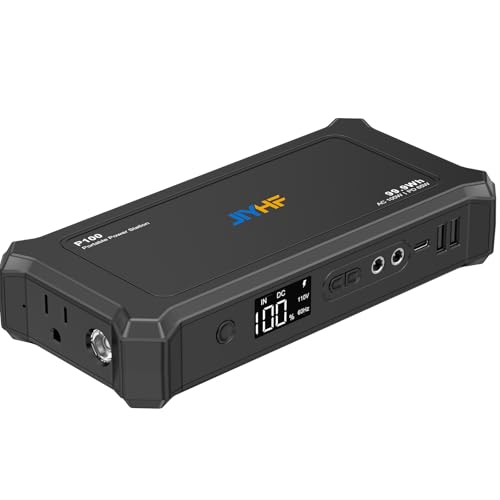
JIYHF 99.9Wh Power Bank with AC Outlet

Paopaoyu 27000mAh 100W Portable Power Station

AOHI 140W PD3.1 40000mAh Laptop Power Bank
RGVOTA 38800mAh 5-Output Power Bank
A Closer Look At Each Pick
Commuters gain more from an easy-to-carry charger than a large station that demands its own bag. This Trozk model combines a 10,000mAh capacity with USB-C and USB-A connections, making it more versatile than a phone-only battery pack. It also fits neatly into a daily carry while offering a digital display for checking remaining power.
Power Delivery, or PD, is a charging standard that lets a compatible device negotiate its appropriate input level. The stated 30W output can support many compact notebooks, although demanding models may draw more. For lighter laptops and mixed phone charging, this is a balanced travel companion.
Benefits That Matter
- The 10,000mAh capacity offers useful reserves for a workday away from an outlet.
- USB-C and USB-A ports reduce cable clutter across phones, tablets, and laptops.
- PD 30W output suits compatible notebooks that need more than a basic phone charge.
- The digital display gives a clearer reserve check than a row of tiny LEDs.
Small Caveats
- Its capacity sits below the larger options here, so heavy use may require more than one charge cycle.
- Owners should avoid leaving a power bank packed in a hot vehicle, since elevated temperatures can shorten battery life.
Feature Snapshot
Made For
You benefit most from Trozk during commutes, short flights, and workdays spent away from wall outlets.
A Better Fit Elsewhere
The AOHI 140W PD3.1 40000mAh Laptop Power Bank better suits power-hungry notebooks and extended trips.
A sudden outage can take down more than a laptop, including the router needed for a remote session. The APC BE500G3 protects and temporarily powers networking equipment, computers, and other home-office electronics. Unlike the Trozk charger, it stays beside your desk and automatically responds to an interruption.
The stated 500VA and 300W output define its practical envelope, and device power requirements vary. A compact desktop and router may fit comfortably, but a gaming notebook and monitor together could exceed it. For short-duration continuity rather than all-day mobile charging, this stationary approach makes sense.
Where It Delivers
- A 300W maximum output supports a suitable mix of office electronics.
- Battery backup keeps internet equipment running through brief outages.
- Surge protection adds a second line of defense for connected equipment.
- The stationary format avoids carrying a heavy battery across the country.
Things To Consider
- VA measures apparent power, so the real load depends on both voltage and current drawn by your equipment.
- You must size the UPS for your connected devices; the 300W ceiling leaves no room for a high-load workstation.
- Place it in a dry, ventilated position, and reconnect devices after an outage rather than leaving every outlet occupied.
Key Specs
Built With In Mind
This APC model fits remote workers, students, and households that need their router and small electronics to remain online during an outage.
Another Choice May Suit
The APC BK350 350VA 210W Back-UPS better suits smaller desks with lighter connected equipment.
The BE500G3 handles a broader office load, but its extra capacity can be unnecessary in a compact workspace. The APC BK350 drops to 350VA and 210W while retaining three battery-backed outlets and three surge-protected-only outlets. That split matters: only the first three carry connected equipment through a power loss.
You can add a modest laptop, network equipment, and another low-load device as long as the total stays below the limit. The included six-foot cord and right-angle plug help with placement behind furniture. It is less mobile than a power bank, yet often more practical for uninterrupted desk work.
Strengths Worth Knowing
- Three backed outlets protect a laptop, router, and related low-power device.
- Three additional outlets still provide surge protection for noncritical electronics.
- The replaceable battery design supports longer ownership with the correct APC RBC2 pack.
- Its 210W ceiling keeps the load calculation easier to understand.
Less-Strong Areas
- A high-power gaming laptop or large monitor can reach the output ceiling quickly.
- You must check whether each outlet provides battery power or surge protection only.
- Keep vents clear and use a dry location, as prolonged heat can shorten battery and electronics life.
Right Fit For
Students and apartment residents benefit from this model when a router and lightweight laptop need short-term protection.
Where Another Pick Shines
The APC BE500G3 500VA 300W Backup Power Supply better serves a desk with several small office devices.
Laptop chargers with a wall plug need a wall outlet, which leaves you dependent on terminals, hotels, and cafés. The JIYHF 99.9Wh model places a 100W AC outlet, a 65W USB-C PD connection, two USB-A ports, and a 12V DC output in one portable battery. That mix is unusually flexible for a travel kit.
For frequent fliers, the stated 99.9Wh size falls within the usual airline carry-on threshold, though airline policies still deserve confirmation before departure. The AC side avoids proprietary adapters for compatible notebooks. Compared with Trozk’s smaller 10,000mAh design, this unit offers broader output options with a bulkier travel profile.
What It Does Well
- The 100W AC outlet can serve compatible laptops that need a conventional plug.
- The 65W USB-C PD port supports direct charging for modern notebooks and tablets.
- Two USB-A ports add flexibility for accessories using older connections.
- Wh-based sizing gives travelers a more relevant capacity reference than mAh alone.
Practical Considerations
- The built-in AC inverter adds weight and bulk compared with a direct USB power bank.
- Not every laptop charger accepts third-party AC power, so compatibility needs confirmation.
- Carry only spare lithium batteries in cabin luggage, and stop using a damaged or unusually hot unit.
Technical Highlights
Who Will Love This
Frequent travelers benefit from JIYHF when their laptop and several smaller devices must share one portable power source.
Swap It Out When
The Trozk Portable Charger 10000mAh PD 30W Power Bank is easier to carry for light phone-and-tablet workdays.
Where JIYHF focuses on travel, this Paopaoyu unit leans toward camping, road trips, and locations with several small devices to serve. Its 100W AC outlet handles compatible laptops, cameras, and lights, while 65W PD provides a direct USB-C charging path. The 27,000mAh battery gives it more stored energy than the 99.9Wh JIYHF model.
That capacity is useful, though not lightweight to carry for long distances. In a vehicle or campsite, its broader energy reserve becomes easier to justify. You still need to account for conversion losses, device draw, weather, and cable placement rather than treating the stated capacity as uninterrupted laptop runtime.
Reasons It Performs
- The 100W AC output serves a wider range of small electronics than a phone-focused power bank.
- 65W PD offers efficient direct charging for compatible USB-C laptops.
- The 27,000mAh battery reduces dependence on campground or vehicle outlets.
- One unit can cover a laptop, phone, camera, and portable light without separate batteries.
Possible Compromises
- The larger battery likely adds weight compared with a compact travel pack.
- A 100W inverter is unsuitable for high-draw appliances and many gaming desktops.
- Keep it dry during outdoor use, and allow the unit to cool before recharging after a heavy session.
Built With In Mind
Campers, road-trip planners, and remote workers benefit from Paopaoyu when several modest devices need remote power.
Reach For A Different Pick
The JIYHF 99.9Wh Power Bank with AC Outlet better suits air travel where carry-on limits and weight matter more.
The AOHI model is built around the power demands of notebooks rather than phones. Its 140W PD3.1 output is the highest stated laptop-focused rate in this group, and the 40,000mAh capacity provides a substantial reserve. For a demanding notebook, that extra headroom can matter more than fitting into a jacket pocket.
PD 3.1 is a newer USB Power Delivery profile intended to support higher negotiated outputs for compatible hardware. You must pair it with a suitable cable and an accepting laptop. Unlike the JIYHF, AOHI relies on USB delivery rather than a conventional AC outlet, making it cleaner for a battery-based travel setup.
Why It Works Well
- 140W output provides meaningful power for compatible high-demand laptops.
- The 40,000mAh capacity supports longer periods away from an outlet.
- PD 3.1 can negotiate higher levels with compatible devices and cables.
- The 2-in-1 positioning suits users who alternate between portable and desk-based charging.
Details To Watch
- Older notebooks may accept only lower USB-C power levels.
- Its large capacity makes this more of a transport item than an everyday pocket accessory.
- Owners commonly need to plan cable and connector storage around a unit this large.
Core Details
Made For
You benefit most from AOHI with a high-power USB-C laptop that needs substantial output away from a wall.
Consider Something Else When
The JIYHF 99.9Wh Power Bank with AC Outlet better fits a notebook that requires a standard wall-plug charger.
RGVOTA takes a different approach from the AC-focused models by concentrating on a bank of USB connections. It offers five outputs, two inputs, and bidirectional USB-C charging, with a stated 38,800mAh capacity. That arrangement suits a table shared by several phones, tablets, or accessories during an outdoor trip.
Capacity alone does not determine laptop suitability, and the available source does not state a maximum laptop wattage. You should verify the connection protocol, output rate, and cable requirements listed for your computer. Within those limits, the five-output layout is a practical reason to choose it over smaller three-port designs.
Standout Benefits
- Five outputs reduce cable contention among several devices.
- Two inputs offer more than one way to recharge the power bank.
- Bidirectional USB-C can accept input and provide output through the same connector type.
- The 38,800mAh capacity offers ample reserves for mixed phone and tablet use.
Trade-Offs To Consider
- The supplied information does not establish compatibility with a particular laptop wattage.
- Five outputs and a large battery can make the unit too bulky for a minimal carry-on setup.
- Distribute output carefully, and store the power bank in a dry, moderate-temperature location.
Feature Facts
The Right Fit
Families, field crews, and group travelers benefit from RGVOTA when numerous personal devices share one reserve.
A Better Fit Elsewhere
The AOHI 140W PD3.1 40000mAh Laptop Power Bank better serves a specific high-output USB-C notebook.
Choosing The Right Portable Power Strategy
Start with the distinction between mobility and continuity. A power bank follows you through a commute, flight, or field assignment, while a UPS protects equipment that remains connected to a desk. Some people need both approaches, but mixing them without a clear purpose often adds bulk without improving the actual setup.
Match Power To Your Notebook
Laptop charging is measured in watts, and higher numbers allow faster charging only when the computer and cable accept that level. A USB-C power bank may suit a modern notebook, while a conventional AC outlet covers a laptop whose charger uses a wall plug. Confirm the charger’s input requirements before relying on a larger advertised output.
Read Capacity In Context
Batteries are commonly labeled in watt-hours or milliamp-hours, and each has a different role. Watt-hours describe stored energy more directly, while milliamp-hours require a voltage to calculate watt-hours. Actual runtime also changes with screen brightness, workload, conversion loss, battery condition, and cable efficiency, so treat capacity as an upper limit rather than a promise of exact duration.
Balance Ports Against Portability
More outputs make shared charging easier, but they also increase bulk and can divide available power. One USB-C port is enough for a single lightweight laptop; multiple ports serve a travel party or a collection of accessories. Consider battery management too, as repeated heavy discharge and storage in hot conditions can affect long-term condition.
Account For Outage Conditions
An uninterrupted power supply works from a wall connection and supports equipment through short interruptions. A portable battery is usually better suited to travel because your laptop can be disconnected and carried elsewhere. Homes with stable mains power and critical internet equipment may favor a UPS, while frequent travelers often benefit more from a compact power bank.
Two Details That Shape Your Choice
Mistakes Worth Dodging
A large output rating does not confirm that a laptop will accept it, and a high capacity label does not reveal its physical weight. Avoid comparing mAh values without voltage, and confirm whether your notebook needs USB-C Power Delivery or a conventional AC plug. Those checks prevent a powerful-looking charger from becoming an oversized dead weight.
What The Higher Tier Buys
Higher-output models add faster charging potential, larger reserves, or more output choices. Those benefits matter for demanding notebooks, long working days, and groups sharing one unit. For occasional phone charging, the added capacity and weight may offer little practical value, making a smaller balanced option more sensible.
Frequently Asked Questions
Can A Power Bank Charge Any Laptop?
No. Your laptop must support the connector, voltage, and charging protocol offered by the power bank. Conventional wall-plug chargers need an AC outlet, while many modern notebooks accept USB-C Power Delivery.
How Long Will A Laptop Battery Last?
Runtime depends on the power bank’s capacity, laptop wattage, workload, screen brightness, and charging losses. A larger battery provides more energy, but the actual duration varies with how heavily your computer runs.
Are UPS Units Better Than Power Banks?
A UPS suits a laptop and network equipment that stay beside a desk during an outage. A power bank offers greater mobility and can move with you, making it the stronger fit for travel and locations without wall connections.
Can I Carry A 99.9Wh Power Bank On A Flight?
The 99.9Wh rating falls within the commonly recognized airline carry-on threshold, though airline rules can vary. Check the carrier’s current policy before travel and keep any spare lithium batteries in your cabin baggage.
Which Output Is Best For A Laptop?
Choose the highest supported level that your laptop, cable, and charger configuration can negotiate safely. A 30W pack may suit lighter computers, while 65W to 140W options make more sense for power-hungry USB-C notebooks.
