


A blackout during a workday can leave a desktop disconnected, a home office dark, and unsaved files exposed to sudden shutdowns. Battery backups for computers provide short-term power and controlled shutdown time, while surge protection helps guard connected equipment during unstable line power. Your setup determines the right capacity, output type, outlets, and connection style. Consider these options for a home office, media center, network rack, or compatible network-attached storage system.
Your Options, Compared

CyberPower SL950U Standby UPS
Oeveo UPS Mount 143 Wall Mount, Black Powder Coat

GOLDENMATE 1500VA/1000W Lithium UPS

APC APCRBC160 Replacement Battery

APC APCRBC123 Replacement Battery

GOLDENMATE 1000VA/800W Lithium UPS
UGREEN NAS UPS US3000 120W DC
Taking A Closer Look At The Options
The SL950U gives a desktop, monitor, router, or game console a place to ride through a brief outage. A UPS, or uninterruptible power supply, supplies battery power after line power fails, giving your equipment time to shut down without an abrupt cutoff. Its slim profile appears more practical than the wall-mounted hardware covered later, especially beside a desk.
For a daily remote-work setup, the mixture of five protected UPS outlets and three surge-only outlets is versatile. The simulated sine wave works well with typical AC-powered electronics, though sensitive or specialist equipment may require a pure sine wave output. You should check device requirements before replacing a computer power supply.
Key Advantages
- The 950VA and 510W rating covers many desks with room to spare.
- Two widely spaced outlets accommodate bulky power adapters.
- USB-A and USB-C ports support convenient phone charging.
- Five-foot input cord offers more placement flexibility.
Worth Noting
- Simulated sine wave output may not suit every sensitive device.
- Outlets remain crowded around large adapters despite two wide spaces.
- Positioning the upright unit requires access to the front and rear controls.
Quick Facts
Built With In Mind
You benefit most from this model with a mixed home-office or entertainment setup using ordinary AC-powered devices.
A Better Fit Elsewhere
The GOLDENMATE 1000VA/800W Lithium UPS offers more headroom for a larger desktop and power-hungry peripherals.
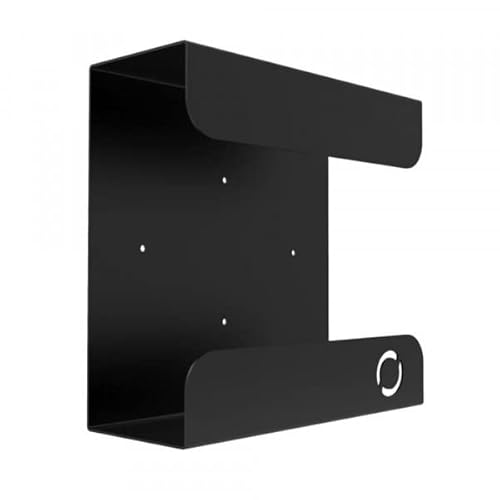
This is an accessory rather than a battery backup, but it solves a separate part of the ownership puzzle. It holds a compatible APC or CyberPower UPS against a wall or sturdy vertical surface, freeing the floor beside a desk or network cabinet. You still need a separate UPS, so it doesn’t provide runtime by itself.
The roughly 11-inch-deep enclosure fits common compact units, and the flat black powder coat suits most utility spaces. Installation quality depends on wall material, fastener placement, and cable clearance, making stud-backed locations a sensible expectation for heavy equipment.
Useful Highlights
- A wall position keeps floor space open in compact offices.
- The stated load limit supports many residential UPS units.
- Included hardware reduces the need for a separate mounting kit.
- Single-unit format fits homes with only one backup to secure.
Practical Considerations
- You must confirm the UPS dimensions and weight before installation.
- Wall strength matters, especially for heavier battery systems.
- Power and network cables need enough bend radius after mounting.
Feature Snapshot
Made For
You’ll value this bracket most in a home office or network closet where floor space is limited.
Where A Sibling Pick Shines
The CyberPower SL950U Standby UPS is the more complete choice when you need actual outage coverage rather than a mounting accessory.
The larger GOLDENMATE model targets desktops, workstations, and setups with several powered peripherals. Its 1,000W maximum output offers more capacity than the SL950U, while the lithium iron phosphate battery chemistry is designed for extended service compared with conventional lead-acid systems. That makes it a credible fit for a busy office that can’t tolerate every brief outage immediately.
The source specifications describe a 51.2V, 5.8Ah battery pack and a lifespan exceeding 10 years with more than 3,000 charge cycles. Those figures are manufacturer claims rather than an independent result, so runtime still depends on your load and operating conditions.
What It Does Well
- 1,000W output accommodates a substantial computer load.
- Lithium iron phosphate chemistry supports long service potential.
- The higher capacity suits gaming rigs and multiple peripherals.
Smaller Details To Check
- The larger capacity may be unnecessary for a laptop-only desk.
- Runtime will shorten with heavier connected equipment.
- Lithium systems require compatible charging and ventilation considerations.
Who It Suits Best
This model suits power users with a full desktop, multiple displays, and several connected devices.
Consider A Different Option
The CyberPower SL950U Standby UPS may suit you better when a smaller desktop and router need only brief shutdown support.
This cartridge restores backup runtime in an APC Back-UPS BR1000MS rather than adding a new UPS. That distinction matters for an established home office: you may retain a unit already positioned near your desktop, router, and monitor, replacing only its battery cartridge. The model-specific fit is the key advantage, since installation should be limited to compatible equipment.
VRLA means valve-regulated lead-acid, a sealed battery format commonly used in small UPS systems. You should compare the cartridge number and your UPS model before ordering, then follow the unit’s replacement instructions. Owners of older systems may find this more economical than replacing the entire enclosure.
What Works In Its Favor
- Designed specifically for the APC BR1000MS model.
- Restores backup capability without moving your UPS setup.
- The cartridge format simplifies routine battery maintenance.
- A suitable alternative for retaining an existing APC enclosure.
Points To Note
- It is useless with an incompatible UPS model.
- Replacing a cartridge does not upgrade the UPS’s capacity.
- Older batteries may need careful handling during replacement.
Feature Facts
The Right Fit
This cartridge is right for an established BR1000MS installation whose battery no longer provides dependable runtime.
Look Elsewhere When
The GOLDENMATE 1000VA/800W Lithium UPS makes more sense when you want a new, higher-capacity unit instead of an APC replacement cartridge.
The APCRBC123 serves a different APC installed base from the BR1000MS cartridge. It is intended for listed Smart-UPS and compatible systems, making it relevant to offices that need to maintain existing power equipment rather than replace the enclosure. You benefit from preserving familiar placement, cabling, and outlet arrangements.
This is a replacement component, not a complete computer backup system. Confirm the exact UPS model, cartridge number, and battery condition before installation. A new battery does not repair other UPS faults, so repeated alarms or failed self-checks may point to another component or an unsuitable replacement.
Noteworthy Benefits
- Maintains backup runtime in compatible APC equipment.
- Avoids replacing a larger UPS enclosure unnecessarily.
- Sealed VRLA construction suits routine indoor maintenance.
- Supports several named Smart-UPS configurations.
Trade Offs To Consider
- The model match must be confirmed before purchase.
- You still need access to the UPS’s battery compartment.
- Runtime remains limited by the host UPS’s design and load.
Who Should Grab It
You should grab this cartridge when your existing APC unit matches the listed models and only its battery needs service.
Swap It Out When
The UGREEN NAS UPS US3000 is a better choice for a compatible UGREEN NAS, not a conventional APC desktop UPS.
This midrange GOLDENMATE model sits between a modest desktop backup and a high-output workstation system. Its 1,000VA and 800W figures give you room for a computer, monitor, router, and selected accessories, while the lithium iron phosphate battery pack is positioned as a long-cycle alternative to lead-acid designs. That profile works especially well for a home office used several hours a day.
The listed 12,000mAh-class NAS alternative and the GOLDENMATE’s own lithium specifications should not be treated as identical. Runtime depends on load and conversion losses, so start with the device list rather than capacity alone. A smaller desktop may run longer than expected, while a gaming system can shorten the available window considerably.
What Helps Most
- 800W output covers a typical office load.
- Lithium battery chemistry supports frequent cycling.
- The white enclosure fits light-colored workspaces.
- Surge protection is combined with backup power.
Possible Compromises
- Heavy gaming hardware may exceed the intended load profile.
- White housing may not blend with darker office furniture.
- Actual runtime depends on connected-device consumption.
Quick Technical Notes
Best Suited To
You benefit most with a standard desktop, monitor, router, and modest peripheral load.
Another Choice May Suit
The GOLDENMATE 1500VA/1000W Lithium UPS better serves a desk with higher output needs or additional equipment.
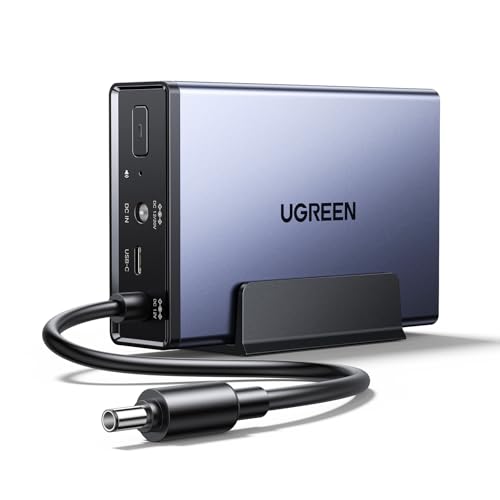
The US3000 targets a narrower purpose than the desktop UPS systems in this list: selected UGREEN NAS models. Its 120W DC output and 12,000mAh battery are designed to protect compatible two-bay and four-bay systems, including several DXP and DH models. That specialization can make it tidier than a general-purpose UPS beside a compact NAS.
You need to check the NAS model number before ordering. The DXP6800 and DXP8800 series are expressly excluded, and other UGREEN models may also fall outside the supported list. The enclosure is designed for quiet operation in a workspace or sleeping area, though actual noise depends on load and installation conditions.
Benefits That Matter
- Supports a clearly listed range of UGREEN NAS models.
- 120W DC output targets storage-system power needs.
- Compact form suits a NAS shelf or media cabinet.
- Quiet operation suits a home office or bedroom.
Small Caveats
- It is not a general-purpose UPS for a desktop monitor or router.
- Model compatibility is essential, particularly for excluded series.
- Cable routing and ventilation still matter in a crowded shelf.
At A Glance
Made For
You’ll value this compact unit when your NAS appears in the supported UGREEN model list.
Reach For A Different Pick
The GOLDENMATE 1000VA/800W Lithium UPS better fits a desktop and mixed computer peripherals.
Choosing Backup Power That Fits Your Setup
Start with the equipment you need to keep running. A desktop, monitor, router, and network storage system can produce very different loads, so you’ll want a UPS whose supported wattage covers the connected equipment with sensible headroom. A replacement battery is a separate category and only fits systems designed for it.
Match Capacity To Daily Use
The 510W CyberPower SL950U fits many standard desks, while the 800W and 1,000W GOLDENMATE models offer more capacity for demanding workstations. UGREEN’s 120W DC model serves compatible NAS equipment rather than a complete desktop. Your actual runtime will depend on device consumption, battery condition, and the amount of time needed for shutdown.
Check Power Shape And Outlets
A UPS may provide battery-backed outlets, surge-only outlets, or both. Output waveform matters for sensitive electronics, so verify device requirements before choosing a standby unit with simulated sine wave output. Bulky power adapters also need physical clearance, which is why spaced outlets can be more valuable than an extra connector in a cramped installation.
Account For Installation
A UPS works best on a stable, ventilated surface, while a wall mount can free floor space but requires suitable support and careful cable routing. NAS-specific units need exact model compatibility. Check dimensions, connector type, battery access, and nearby outlets before moving equipment into place.
Small Details That Change The Fit
Mistakes Worth Dodging
Many mistakes come from treating every UPS as interchangeable. Matching only the brand or nominal wattage can leave you with incompatible connectors or insufficient runtime. Check the host model, power requirements, output type, and physical space before purchasing.
What The Higher Tier Buys
Higher-tier models commonly add capacity, battery technology, or specialized connections. That extra capability matters for heavy workstations, long service cycles, or a NAS that must remain reachable through an outage. A modest desk may receive more than enough protection from a smaller, simpler configuration.
Frequently Asked Questions
How long should a computer UPS last?
Runtime depends on battery capacity and connected load. A computer with several peripherals usually consumes more power than a laptop and router alone.
Is a UPS the same as a surge protector?
No. A surge protector diverts or limits voltage spikes, while a UPS supplies battery power during an outage. Some models combine both functions.
Can a UPS protect a NAS?
Only a model with compatible power and connection requirements will work well. The UGREEN NAS UPS US3000 supports a specified list of UGREEN NAS models.
Should you replace a UPS battery cartridge?
Replacement can extend the service life of a compatible UPS. Confirm the exact model and cartridge number, since a similar-looking battery may not fit.
What size UPS does a gaming computer need?
You’ll need enough supported wattage for the computer, monitor, and peripherals. Stay within the UPS’s rated output and leave some headroom for startup and peripheral changes.
Wrap Up
The best fit depends on your equipment and your tolerance for brief outages. The CyberPower SL950U suits many ordinary desks, GOLDENMATE offers higher-capacity lithium options, and the UGREEN model serves compatible NAS setups. APC cartridges help preserve existing systems, while the Oeveo mount improves where the hardware lives. Choose for capacity, compatibility, and the shutdown time your setup actually needs.
