


A Chromebook loses much of its convenience when the wall outlet disappears. Battery coverage matters during long commutes, remote classes, café sessions, and outages, but many replacement parts and desktop UPS systems only support specific ASUS models. The choices below separate direct laptop batteries, replacement chargers, and outlet-independent backup power so you can match the right solution to your exact hardware.
The Lineup, Simplified

Superer UL Listed ASUS L406 Vivobook 14 AC Charger

GOLDENMATE 1500VA/1000W Lithium UPS, White
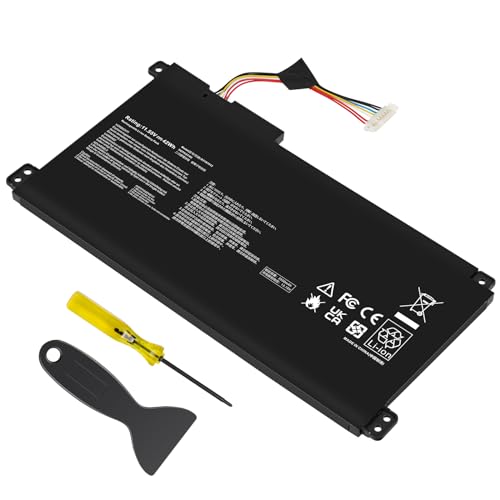
TREE.NB B31N1912 ASUS VivoBook 14 Laptop Battery

GOLDENMATE 1000VA/800W Lithium UPS, White

VJYUIJAY Universal 65W USB-C Laptop Charger

Futurebatt ASUS A32-K55 K55 Series Laptop Battery

GOLDENMATE 1000VA/600W Lithium UPS, White
More On The Choices That Made The List
The Superer charger serves a narrower purpose than the UPS systems later in the lineup: it restores mains power to a specific ASUS L406 family notebook. Its compact AC adapter format suits a study bag or replacement power supply, provided your exact model is among the listed L406 variants.
Unlike a lithium UPS, this option does not keep the computer running during an outage. For daily commuters, a second compatible charger can still prevent a missed deadline after one cable is misplaced or left behind.
The Good Stuff
- Supports several L406M, L406MA, L406SA, and L406S configurations.
- 33W output closely targets the listed Vivobook hardware.
- Broad 100-240V input supports travel across different outlet systems.
- A compact second charger leaves the original adapter available at home.
Things To Consider
- This is an AC adapter, not an internal battery or outage backup.
- Compatibility depends on the precise model and connector listed for your notebook.
- Owners should keep the adapter uncovered and away from heat during travel.
Right Fit For
You benefit most as an L406 owner seeking a spare wall charger for commuting, school, or travel.
A Better Fit Elsewhere
GOLDENMATE 1000VA/800W Lithium UPS, White suits setups that need runtime after an outlet failure rather than model-specific AC charging.
A UPS, or uninterruptible power supply, takes over when mains electricity stops and filters surge exposure for connected equipment. GOLDENMATE’s 1500VA/1000W unit sits at the higher-output end of this lineup, making it more relevant to a desk with a Chromebook, monitor, router, and several accessories.
The lithium iron phosphate battery, commonly shortened to LiFePO4, distinguishes it from conventional lead-acid systems. Its specified endurance of more than 10 years and over 3,000 charge cycles matters more for multi-year ownership than raw capacity alone.
Useful Strengths
- The 1000W output covers a broader desktop load than the 600W and 800W alternatives.
- LiFePO4 chemistry supports a long service-oriented battery lifecycle.
- Desktop-level power protects more than the laptop itself.
- The stated 1500VA rating suits offices with several connected devices.
Practical Considerations
- A 1000W ceiling leaves limited room for high-draw equipment beyond your core setup.
- Runtime varies with the load and the notebook’s power requirements.
- Keep ventilation openings unobstructed and follow the device’s battery-care guidance.
Technical Highlights
Built With In Mind
Home-office workers and students with a multi-device desk benefit most from its higher sustained output.
Where A Sibling Pick Shines
GOLDENMATE 1000VA/600W Lithium UPS, White is the more restrained fit for a single notebook and minimal accessories.
This internal replacement restores unplugged mobility rather than supplying backup power to a wall outlet. It targets several ASUS VivoBook families, including E410MA, L410MA, E410KA, E510MA, E510KA, F414MA, L510MA, and R522MA variants identified in the compatibility list.
Its 42Wh, three-cell lithium-ion pack provides the most direct solution for classes, commutes, and flight-length work sessions, assuming your model matches exactly. Compared with a desktop UPS, it is quieter, lighter, and far easier to carry.
Where It Helps
- 42Wh capacity supports the portable use case without a separate outlet.
- Three-cell design provides a defined alternative to the original internal battery.
- Compatibility spans several common ASUS VivoBook 14 families.
- The 11.55V rating matches the listed B31N1912 and C31N1912 batteries.
Details To Watch
- Your notebook must match a listed family and part number.
- Internal installation requires opening the laptop’s battery compartment.
- Lithium-ion batteries benefit from moderate storage temperatures and partial charge for long idle periods.
Core Details
Who Will Love This
Students and commuters benefit most when their listed VivoBook no longer holds a dependable charge.
Reach For A Different Pick When
GOLDENMATE 1000VA/800W Lithium UPS, White suits users needing outage coverage for a complete desk rather than one internal notebook battery.
The 800W GOLDENMATE occupies the practical middle of the three UPS choices here. It can cover an ASUS notebook plus a monitor and networking equipment without approaching the 1000W ceiling of the larger model, while retaining more output headroom than the 600W version.
For a shared study room or home office, that balance can matter. You gain outage support without dedicating the extra capacity of the 1500VA model, although actual runtime still depends on how much equipment draws power.
Positive Takeaways
- 800W output fits a typical notebook-based office arrangement.
- The LiFePO4 pack is specified for more than 5,000 charge cycles.
- Stated battery life exceeds 10 years for long-term planning.
- The 1000VA rating sits between the smaller and larger units.
Trade-Offs To Consider
- High-resolution displays and other equipment can shorten runtime.
- The larger 1000W GOLDENMATE provides more room for expansion.
- Periodic runtime checks help you understand the load before an outage.
Feature Snapshot
The Right Fit
Home-office users benefit most from its middle-tier capacity and equipment coverage.
Consider Something Else When
GOLDENMATE 1500VA/1000W Lithium UPS, White better serves desks with several power-hungry peripherals.
A single USB-C charger can simplify a travel kit containing several compatible notebooks and tablets. This 65W VJYUIJAY adapter includes ASUS among its listed device families, making it worth checking against your Chromebook’s port and charging requirements before packing it.
The adjustable output profiles support different USB-C devices, but “universal” still means compatible rather than literally universal. A proprietary barrel connector or a device demanding another voltage profile remains outside its stated scope.
Noteworthy Benefits
- One adapter can serve several compatible USB-C devices.
- 65W output suits many mainstream portable computers.
- Wide 100-240V input supports international travel.
- Multiple output voltages improve cross-device flexibility.
Worth Noting
- Your ASUS model must use a compatible USB-C charging setup.
- A suitable rated cable may need to be carried separately.
- Keep the adapter uncovered and away from enclosed, hot spaces.
Made For
Frequent travelers benefit most when several devices in their bag accept the supported USB-C profiles.
Another Choice May Suit
Superer UL Listed ASUS L406 Vivobook 14 AC Charger is the clearer fit for an L406 owner needing its dedicated barrel-style power setup.
This battery targets older ASUS notebooks rather than current Chromebooks, but that can be useful for an aging laptop kept for coursework or basic document work. Its broad K45, K55, A45, A75, X55, and related model coverage offers several routes to compatibility, provided the exact part numbers match.
The six-cell 5200mAh pack operates around 11.1V and is intended as a direct internal replacement. For a long study session away from mains power, that restores mobility without carrying a desktop UPS, though modern-condition battery health remains hard to judge.
What Stands Out
- 5200mAh capacity suits several legacy ASUS notebook families.
- The six-cell configuration restores portable battery operation.
- Long model lists accommodate several K-series and A-series variants.
- Internal installation avoids desktop-sized backup equipment.
Small Caveats
- The supported machines are primarily older ASUS notebooks, not Chromebooks.
- Exact fit must be confirmed against the battery and model numbers.
- Long storage periods call for moderate temperatures and sensible charge maintenance.
Built With In Mind
You benefit most as the owner of a compatible legacy ASUS K55 or related notebook needing renewed portable runtime.
A Better Fit Elsewhere
TREE.NB B31N1912 ASUS VivoBook 14 Laptop Battery better suits listed VivoBook families than these older K-series systems.
The 600W GOLDENMATE is the most focused UPS here, concentrating on a notebook and essential low-draw accessories rather than a crowded workstation. For a small apartment or shared workspace, that restrained ceiling can be an advantage because it discourages connection of equipment beyond the intended load.
Its LiFePO4 battery is specified for more than 10 years and over 5,000 cycles. The trade-off is clear: you lose the broader headroom offered by the 800W and 1000W versions, while gaining a simpler fit for essential electronics.
What Makes Sense
- 600W output targets essential desk equipment.
- The 1000VA rating complements the lower wattage ceiling.
- Specified cycle life supports long-term ownership planning.
- The design fits modest setups without unnecessary expansion capacity.
Possible Compromises
- Multiple monitors and high-draw accessories can exceed the output range.
- Runtime changes with the connected load.
- Position the unit with ventilation paths kept clear.
Made For
Apartment residents benefit most when outage protection is needed for an ASUS notebook and only a few essentials.
Another Choice May Suit
GOLDENMATE 1000VA/800W Lithium UPS, White serves users whose desk setup requires more sustained power.
Match Power Protection to Your Hardware
Start with the type of protection your situation needs. An internal replacement battery restores unplugged mobility, an AC charger recovers mains power after travel, and a UPS supplies power during outages. None of those functions are interchangeable.
Confirm the exact model first
ASUS families often share visual similarities while using different batteries, ports, voltage requirements, and part numbers. Match the complete model designation against the manufacturer’s compatibility list before ordering, especially with broad listings such as the Futurebatt option.
Match the connector and electrical requirements
For a charger, verify the connector, rated voltage, current, and wattage. The Superer adapter centers on 19V, 1.75A, and 33W output, while the VJYUIJAY option uses USB-C power profiles up to 65W. Neither is automatically suitable for every ASUS notebook.
Size a UPS around connected equipment
A UPS rating combines apparent capacity, measured in volt-amperes, with maximum real-world output in watts. Include your monitor, router, speakers, and other connected devices in the load calculation rather than sizing only around the Chromebook.
Consider how you will use the backup
A direct internal battery works well for commuting and classes because it travels with the computer. A UPS remains useful during outages but adds a desktop unit to store, connect, and recharge. Frequent recharging planning and clear placement can help preserve practical runtime.
Avoidable Power Compatibility Errors
Mistakes Worth Dodging
Treating a broad brand name as proof of compatibility can lead to an unusable charger or battery. Confirm the exact model and connector, compare electrical ratings, and measure your connected load before selecting a UPS. A compatible cable and clear ventilation also matter during daily use.
Where The Extra Money Goes
Higher output and larger battery capacity can justify a higher tier when you regularly protect several peripherals. A single notebook and minimal accessories may need less capacity than a shared office full of displays and network equipment. The useful upgrade is the extra headroom your actual setup needs.
Frequently Asked Questions
Are these power options compatible with every ASUS Chromebook?
No, each option supports a defined set of models and connectors. Check your full model number and battery or port designation before purchasing.
Can a UPS keep an ASUS Chromebook running during an outage?
Yes, a compatible UPS can power a Chromebook until its internal battery or available backup capacity runs out. Runtime depends on the connected equipment and load.
Which option travels best?
A compatible internal battery offers the most integrated portability. A compact USB-C or model-specific AC charger can serve as a lighter travel backup without providing outage runtime.
Does a laptop charger act as a UPS?
No. An AC charger converts wall power into laptop power but does not store enough energy to operate after an outage.
How much UPS capacity do I need?
Add up the power requirements of your Chromebook, display, router, and other connected equipment. Choose a rated output with comfortable headroom rather than operating directly at its maximum.
Final Take
The strongest choice depends on your actual hardware: use a matched internal battery for portable freedom, a model-specific or compatible USB-C charger for travel, and a UPS for outages across a desk setup. Exact compatibility matters more than a broad ASUS or Chromebook label, so verify the hardware before choosing.
