


A Dell laptop can lose its clock settings, charge port, or running work after a power interruption. Your solution depends on the problem: a tiny CMOS battery preserves firmware settings, while a UPS keeps a charger and desktop setup operating, and a replacement laptop battery restores cordless use. These seven options cover each situation, but only the batteries explicitly matched to your model should be considered.
An Overview Of The Picks

Rome Tech CR1220 CMOS Battery for MSI GS75 and Asus Q302L

Rome Tech CR2032 CMOS Battery for Dell Latitude 5-Pack

CyberPower BRG1500AVRLCD2 Intelligent UPS

APC BE650G1 650VA/390W UPS Backup
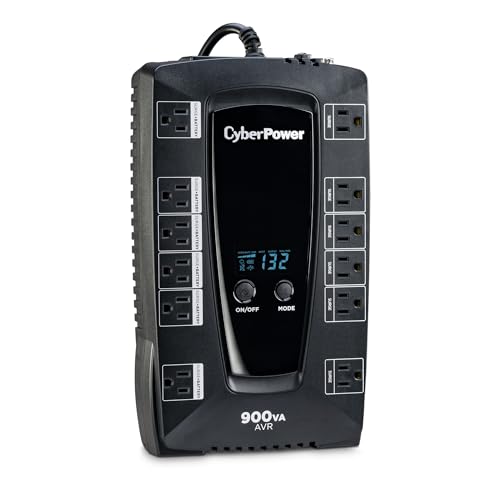
CyberPower AVRG900LCD Intelligent LCD UPS

SUNNEAR 52Wh JHT2H Dell Latitude Battery

SUNNEAR 97Wh XG4K6 Dell XPS 17 Battery
A Closer Look At Each Pick
This tiny CR1220 cell addresses a very specific problem: a compatible MSI GS75 or Asus Q302L losing its date, time, and boot-related firmware settings after a drain. The CMOS battery maintains low-level system data while the laptop is disconnected from power; it does not run the computer like the full-size batteries later in this roundup.
For a technician or experienced laptop owner, the attached two-pin connector may be more useful than a loose coin cell. The pack contains three batteries, giving you replacements for several compatible machines or a spare for future service work.
Positive Points
- Explicit compatibility with the MSI GS75 and Asus Q302L narrows the model-checking burden.
- Wired two-pin construction removes the need to adapt a bare coin cell.
- Heat-shrink covering helps protect the cell and wiring during installation.
- Three units suit a small repair bench or several matching laptops.
Worth Noting
- The two-pin connector must match the original battery before purchase.
- Owners commonly discover that cramped laptop interiors make cable routing more delicate than the simple electrical connection suggests.
Made For
You benefit most with an MSI GS75 or Asus Q302L that loses firmware settings whenever the main battery is removed.
A Better Fit Elsewhere
The Rome Tech CR2032 CMOS Battery for Dell Latitude 5-Pack is the better choice for the Dell Latitude models named on its listing.
Dell owners get a broader selection of named systems here, including Latitude 6430u, 7300, 7430, 7490, E7240, E5440, and Alienware 15 R3. The CR2032 cell performs the same firmware-setting role as the earlier MSI and Asus option, making it useful for preserving the clock after repairs, battery swaps, or extended time without a charger.
The five-pack is the more practical option for a repair technician supporting several listed machines. Cable lengths of 2.95 and 3.74 inches provide routing choices inside different chassis, although connector orientation remains the critical installation detail.
Standout Benefits
- Coverage spans several Dell Latitude generations and one Alienware model.
- Five batteries support multiple repairs or provide stock for future service intervals.
- Two stated cable lengths improve routing flexibility in different laptop cases.
- The wired CR2032 assembly simplifies connection to compatible two-pin sockets.
Practical Considerations
- Model names vary by generation, so appearance alone should not determine compatibility.
- Owners commonly report connector fit and plug depth as more important than the cable length.
Right Fit For
This pack suits a small IT team maintaining several of the explicitly listed Dell Latitude or Alienware systems.
Another Choice May Suit
The Rome Tech CR1220 CMOS Battery for MSI GS75 and Asus Q302L is the cleaner match for either of those named laptop brands.
A UPS operates on a different principle from a CMOS or laptop battery: it supplies conditioned power from an internal battery during outages. The CyberPower BRG1500AVRLCD2 suits a desktop workspace with several connected devices, while its LCD provides a visible way to monitor operating status.
Line-interactive topology means the unit uses its battery for a full outage while managing smaller voltage changes through automatic voltage regulation. That correction can reduce unnecessary battery switching, which matters in offices where lights or building loads cause frequent minor fluctuations.
Useful Highlights
- The 1500VA class offers more capacity than the smaller units in this roundup.
- Automatic voltage regulation handles minor input changes without immediately drawing from battery power.
- The LCD makes status easier to check than a basic indicator-light design.
- Surge protection adds value for a multi-device desktop arrangement.
Things To Consider
- A simulated sine wave may not suit every power-sensitive or specialized device.
- The larger enclosure takes more desk or floor space than compact UPS options.
- Runtime depends on connected load and the unit’s remaining battery condition.
Core Details
Built With In Mind
You benefit most with a desk containing a computer, monitor, network equipment, and several accessories that need outage support.
Where A Sibling Pick Shines
The APC BE650G1 650VA/390W UPS Backup fits a smaller home office where desk space is more restricted.
The APC BE650G1 prioritizes a familiar outlet layout and compact footprint, making it more approachable than the CyberPower BRG1500AVRLCD2 for a modest office. Its 650VA/390W rating describes supported capacity, while the eight NEMA outlets separate four battery-backed connections from four surge-only connections.
That distinction matters in a home office: keep the computer, monitor, and network equipment on backup-powered outlets, while lower-priority accessories can use surge protection. The honest limitation is that runtime changes with load, so a monitor and laptop together can shorten available time.
Bright Spots
- Eight NEMA outlets reduce the need for an oversized power strip.
- Four battery-backed outlets support the core equipment during an interruption.
- The compact form fits a home office or AV cabinet more easily than the 1500VA CyberPower unit.
- The 390W maximum figure gives you a concrete load ceiling to check.
Minor Gripes
- Only half of the eight outlets provide battery operation.
- High-draw monitors and computers can reduce runtime.
- Replacement batteries add another maintenance consideration over time.
Whose Shelf It Belongs On
You benefit most at a compact desk with a laptop or desktop, monitor, and a few essential accessories.
Consider Something Else When
The CyberPower BRG1500AVRLCD2 Intelligent UPS offers more capacity for a denser desktop setup.
The AVRG900LCD sits between a minimal adapter and a large desktop UPS. Automatic voltage regulation handles smaller fluctuations, while the LCD gives you a central status view. For a home office or media area, that combination offers a practical middle ground between the APC BE650G1’s outlet emphasis and the larger CyberPower BRG1500AVRLCD2.
Its line-interactive design and simulated sine-wave output are familiar choices for conventional computers, networking devices, and entertainment equipment. The compact enclosure is likely easier to place than a mini-tower-style UPS, depending on the outlets and equipment surrounding it.
The Case For It
- Automatic voltage regulation can reduce battery use during minor power fluctuations.
- The LCD simplifies routine status checks in a shared workspace.
- Its size is more restrained than the CyberPower BRG1500AVRLCD2.
- It supports several common classes of home and office electronics.
A Few Limitations
- The simulated sine wave may not suit every sensitive or specialized device.
- Runtime falls as connected equipment demand increases.
- Periodic battery checks are needed for long unattended setups.
Feature Snapshot
Who It Suits Best
You benefit most with a compact office containing a computer, router, and entertainment equipment that need brief outage support.
Swap It Out When
The APC BE650G1 650VA/390W UPS Backup makes more sense when distinguishing battery-backed and surge-only outlets is your priority.
A 52Wh replacement returns portable power directly to a compatible Dell Latitude 7310 or 7410. Unlike the first four items, this is a full laptop battery rather than a firmware coin cell or desktop UPS, so it helps during meetings, travel, and ordinary cordless work.
The listed 7.6V lithium-ion cell provides 6500mAh of capacity, and the package includes installation tools. That makes it a practical repair option for a compatible machine whose original pack no longer holds a useful charge, though opening a business laptop still calls for careful handling.
Notable Upsides
- 52Wh capacity supports portable use across compatible Latitude 7310 and 7410 systems.
- The 7.6V, 6500mAh lithium-ion specification gives a clear basis for model matching.
- Installation tools reduce the need to source separate screwdrivers.
- The smaller capacity makes this option more manageable than the 97Wh XPS battery.
Practical Considerations
- Compatibility still depends on the JHT2H part number and exact system.
- Owners commonly report that laptop batteries can swell with age, so a damaged pack needs careful handling.
- This battery does not preserve firmware settings or power a desktop UPS.
Who Should Grab It
You benefit most with a Dell Latitude 7310 or 7410 that spends most of its day away from an outlet.
Look Elsewhere When
The SUNNEAR 97Wh XG4K6 Dell XPS 17 Battery suits a larger XPS 17 or Precision mobile workstation requiring more capacity.
The 97Wh XG4K6 targets high-demand Dell XPS 17 and Precision 5750-series machines, a different proposition from the 52Wh Latitude battery. Its 8071mAh lithium-ion capacity can better suit long mobile work sessions, especially for creators carrying a larger workstation.
Compatible part and model names are broader than the shortened product name suggests, but exact verification remains essential. Installation screwdrivers are included, and grade-A cells are specified for up to 500 power cycles, giving you a more concrete durability expectation than capacity alone.
Everyday Wins
- The 97Wh capacity suits XPS 17 and Precision systems with heavier power demands.
- 11.4V and 8071mAh ratings provide clear electrical details for compatibility checks.
- Up to 500 specified power cycles offer a useful durability reference.
- Included screwdrivers simplify a careful replacement at the desk.
Details To Watch
- The higher-capacity pack may add weight compared with a smaller Latitude battery.
- Confirm the XG4K6 part number and exact model before opening the chassis.
- Storage and charging practices affect long-term battery condition.
Profile Match
You benefit most as a mobile creator or technician operating a compatible XPS 17 or Precision 5750 away from power for extended periods.
A Different Pick Fits
The SUNNEAR 52Wh JHT2H Dell Latitude Battery is a more natural choice for a compatible Latitude 7310 or 7410.
Matching Backup Power to Your Dell Setup
Start with the failure you need to solve. A laptop that resets its clock needs a compatible CMOS battery, while a computer that needs to remain running during an outage needs a UPS. A worn main battery calls for a full replacement pack matched to the machine’s voltage, connector, dimensions, and part number.
Confirm the Exact Model
Dell laptop families can contain several similar configurations. Check the model number, battery part number, connector shape, and dimensions before ordering. This matters especially for replacement batteries, where a visually similar shape does not establish electrical compatibility.
Understand CMOS Batteries
A CMOS battery preserves firmware-level information such as date and time while the laptop has no external power. The Rome Tech CR1220 and CR2032 options are wired assemblies with two-pin connectors, so your priority is connector and model compatibility rather than physical coin-cell size alone.
Choose a UPS for Outages
A UPS, or uninterruptible power supply, supplies battery power during an interruption. Compare VA and watt capacity, count the battery-backed outlets, check output form, and allow room for ventilation. A larger capacity can support more equipment, but higher draw shortens runtime.
Match Main Battery Capacity
The 52Wh JHT2H battery favors Latitude mobility, while the 97Wh XG4K6 targets higher-demand XPS and Precision models. Higher capacity can reduce dependence on an outlet during long workdays, but it may also add weight and take longer to charge.
Avoiding Battery Backup Mismatches
Mistakes Worth Dodging
The easiest mistake is treating every Dell battery as interchangeable. Compare the complete model number and part number rather than relying on the case shape. Another common error is expecting a UPS to replace the laptop’s main battery, or a CMOS cell to keep the computer running.
What The Higher Tier Buys
A higher-capacity UPS offers more room for monitors, computers, network equipment, and other connected loads. A higher-capacity laptop battery can support longer mobile sessions, but the extra weight and charging demands may be unnecessary for light use. Match the tier to your equipment and routine.
Frequently Asked Questions
What battery keeps Dell BIOS settings after shutdown?
A compatible CMOS or RTC battery preserves firmware settings such as date and time. The appropriate cell depends on the laptop model, battery dimensions, and connector arrangement.
Can a UPS power a Dell laptop during an outage?
Yes, a UPS can power a compatible Dell laptop and its charger. Runtime depends on the laptop’s power draw, UPS capacity, and the condition of the UPS battery.
Are all Dell Latitude batteries interchangeable?
No. Compare the exact model, part number, voltage, capacity, connector, and dimensions. Similar appearance does not confirm that two batteries are electrically compatible.
Which battery fits a Dell XPS 17?
The SUNNEAR 97Wh XG4K6 Dell XPS 17 Battery lists support for XPS 17 9700, 9710, 9720, and 9730 series models. Confirm the exact configuration and XG4K6 part number before installation.
How do CMOS batteries differ from laptop batteries?
A CMOS battery preserves low-level firmware settings and uses very little power. A main laptop battery powers the display, operating system, and connected workloads, so it needs a much larger capacity.
Wrap Up
Choose the Rome Tech coin cells for firmware-setting loss, a CyberPower or APC UPS for outage continuity, and a SUNNEAR pack for cordless Dell use. Exact model and part-number verification matters more than general branding in every case. The right component turns a vague power problem into a focused repair.
